
Appearance
Orders
The Orders module is the global hub for issue delivery orders across all publications. It complements the Issue Distributions tab inside Publications by listing every order in one place, with KPI filters, issue scoping, and deep order detail including distribution plans and a plan drawer.
Purpose and outcomes
- See counts of orders in Processing, Pending, and Approved states and click a KPI card to filter the table by that status.
- Narrow the list by issue (searchable select) and by free-text order name.
- Open order detail to review summary metadata, approve when you are the assigned reviewer on a Pending order, and inspect each distribution plan line in a drawer.
Who it is for
Requires Issue delivery permissions (list access for the hub; approve access plus business rules for the approve button). Exact visibility follows Settings role configuration.
Scope
- In scope: Distribution orders list (hub) and order detail (same experience when opened from Publications issue context, with different navigation chrome).
- Related: Creating or editing orders from the publication issue context is documented under Publications → Issue Distributions.
Key concepts
- Distribution order — shipment/work unit for delivering copies of an issue to customers/clubs according to plans.
- Order status — the UI shows Processing, Pending, and Approved as human-readable states.
- Reviewer-gated approval — the Approve order control appears only when your user id matches the order’s reviewer, the order is Pending, and you hold APPROVE permission (implementation detail subject to change—verify in UI).
Distribution orders hub
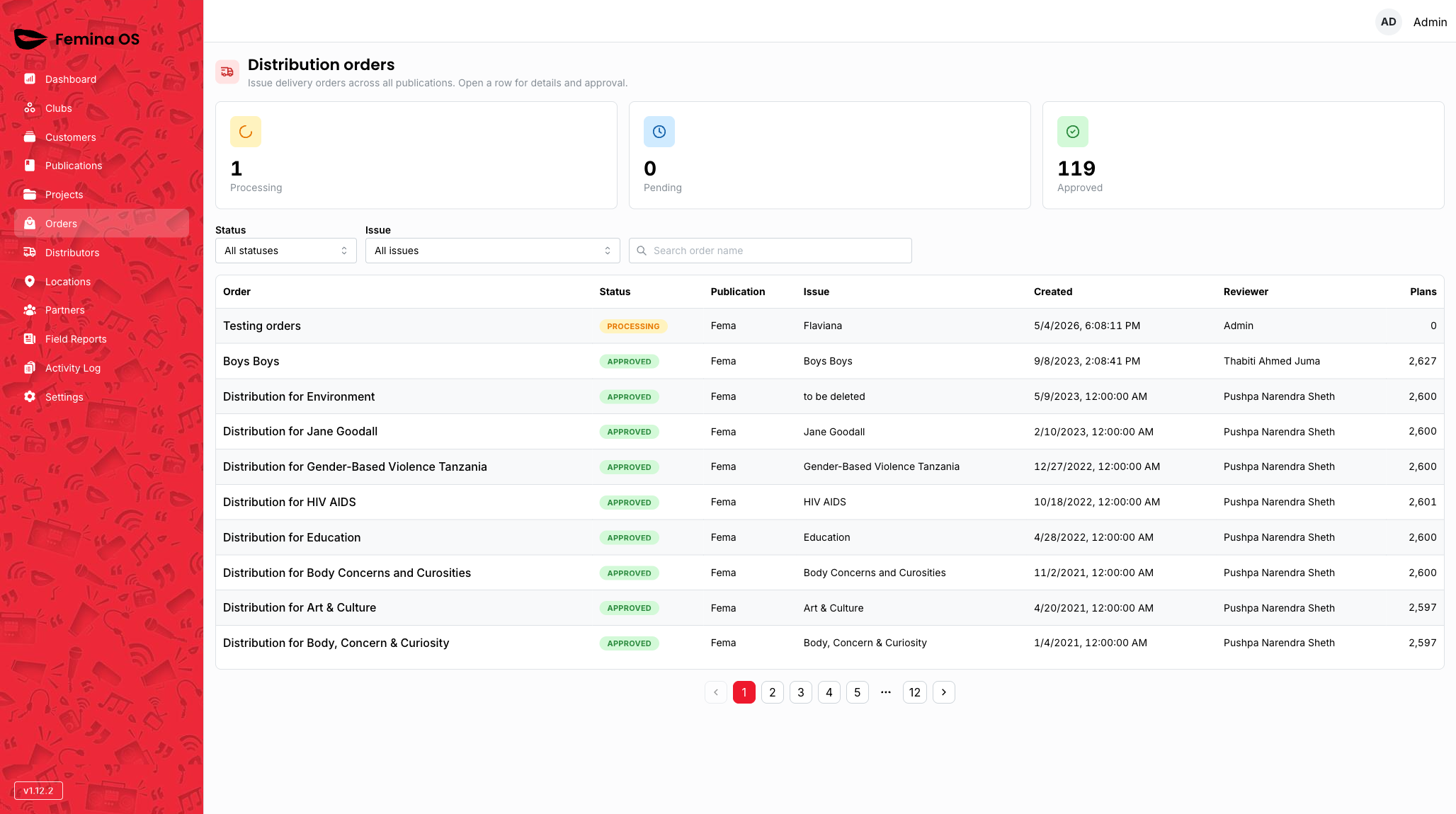
Screenshot: Title Distribution orders, subtitle about cross-publication list, three KPI cards (Processing, Pending, Approved), filters row (Status select, Issue select, search field), table, pagination.
KPI stat cards
Click Processing, Pending, or Approved to toggle that filter in the address bar (click again to clear). Active card shows highlighted border/background.
Screenshot: Pending card selected with blue emphasis; table filtered to pending rows only.
Filters
- Status — All statuses, or one of Processing, Pending, or Approved.
- Issue — All issues, or pick one issue (label shows publication name, issue number, theme).
- Search — filters by order name.
Table
Each row opens order detail (same route pattern as from publications). Empty state: “No distribution orders match your filters.”
Order detail
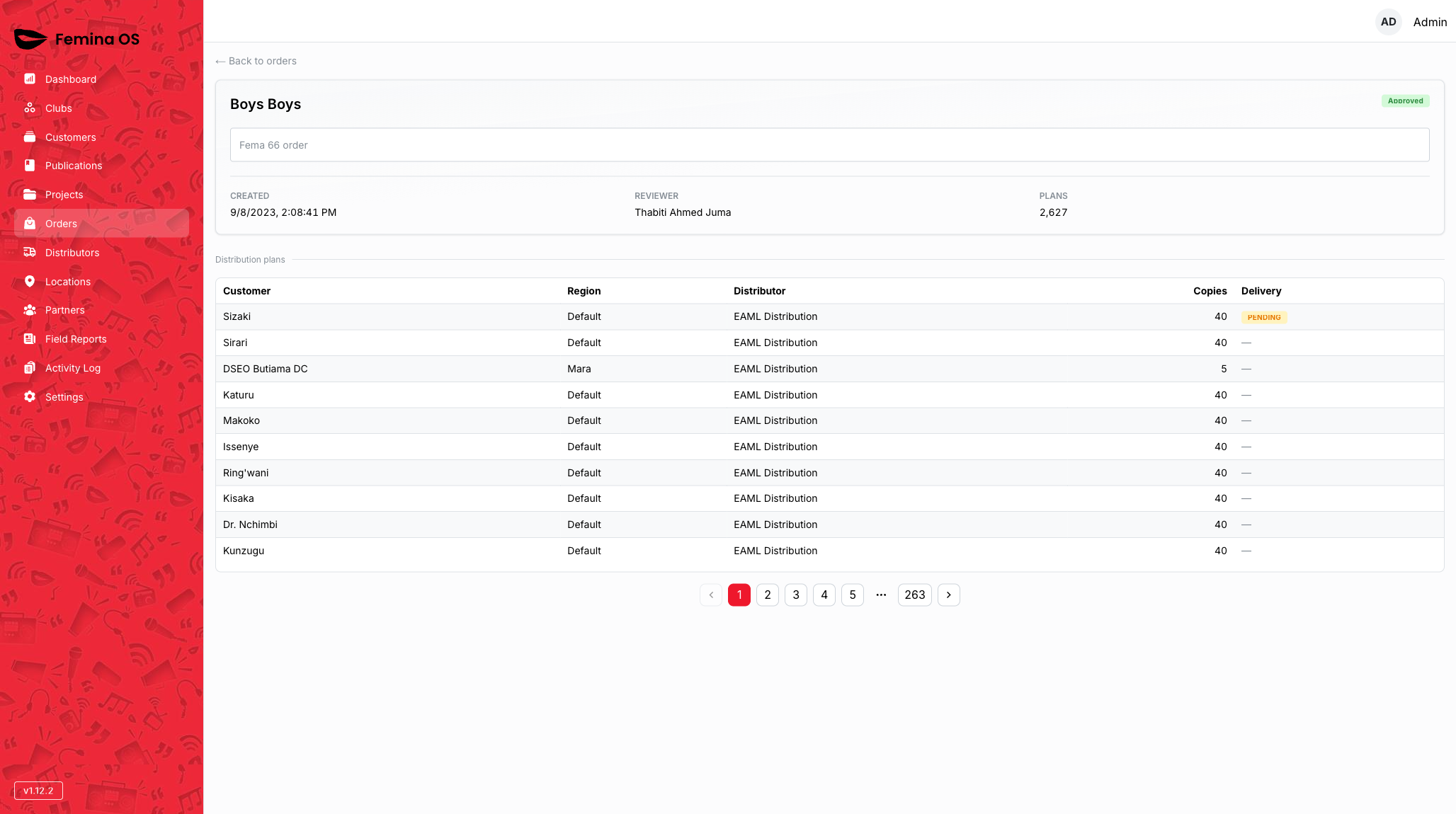
Screenshot: Back link “← Back to orders”, summary card with order metadata, status badge, and optional Approve order button when approval is available for your user.
Approve order
When visible, Approve order runs immediately (no intermediate confirmation dialog in the current product).
Screenshot: Summary card with green Approve order button and loading state on the button while the request runs.
- Outcome: Order moves toward Approved (or shows an error notification on failure).
Distribution plans table
The distribution plans section lists plan lines for the order’s issue context.
Screenshot: Table of plans with quantities and customer references per row.
Plan detail drawer
Clicking a plan row opens the plan detail drawer.

Screenshot: Drawer anchored to the right showing the selected plan’s breakdown; close control returns to the table state.
- Outcome: Inspect line-level quantities without leaving the order page.
Same order from Publications
Opening the same order from an issue’s Issue Distributions tab renders the same summary and plan components, with publication and issue breadcrumbs instead of the Orders hub back link.
Screenshot: Order detail opened from an issue’s Issue Distributions tab showing contextual breadcrumbs.
Workflows
Find orders waiting on you
- Open Orders.
- Click Pending KPI card.
- Optionally pick your Issue from the Issue select.
- Open a row → confirm you see Approve order; click it and wait for success feedback.
Investigate fulfilment for one issue
- Set Issue filter to the target edition.
- Open each order row to read plans; expand Plan detail drawer per suspicious line.
Return to the hub
From detail, use ← Back to orders (global entry) or breadcrumbs when you arrived from Publications.
FAQ
Why can I not see Approve order?
You may not be the reviewer, the order may not be Pending, or you lack APPROVE permission.
Do Processing orders need approval?
Only Pending orders show the reviewer approval affordance in this client; processing represents in-flight handling elsewhere in the workflow.